

Reviewed · TOKYO TRAVEL ESSENTIALS
Japan Unlimited WiFi Router – Narita Airport Pickup
Arriving in Japan with a working internet connection can save you from a lot of early-trip friction. This Narita Airport WiFi rental gives you a pocket router, charging gear, and a power bank so you can check maps, translate signs, message your hotel, and find train information as soon as you land. Pickup is available at either Terminal 1 or Terminal 2, outside airport security.
I like two things right away: the flexible rental length, which covers trips from 3 to 30 days, and the simple equipment bundle. Having a power bank included is especially useful on long sightseeing days when your phone is busy with maps and photos. The main caution is the data limit: high-speed use is capped at 3GB per day, and the stated connection capacity is inconsistent, so I would plan around five connected devices rather than ten.
In This Review
- Key points to know before booking
- Turning on your connection at Narita Airport
- What comes in the rental package
- Using 4G LTE around Japan
- How many devices can connect?
- Rental periods from 3 to 30 days
- Returning the router without a last-minute problem
- The main strengths for a Japan trip
- The limitations you should weigh
- Who will get the most value from it?
- Should you book the Narita WiFi rental?
- FAQ
- Where do I pick up the WiFi router?
- Are the pickup counters inside airport security?
- How long can I rent the router?
- What type of connection does the router provide?
- How many devices can connect to the router?
- What equipment is included?
- Is high-speed data unlimited?
- What happens if I do not pick up the router?
- Can I cancel for a full refund?
Key points to know before booking
- Pick up at Narita Terminals 1 or 2: The counters are outside security and close to public transportation.
- Use 4G LTE across Japan: The router is intended for maps, messaging, social media, video, and other everyday online needs.
- Choose 3 to 30 days: The rental period can match a short stopover or a longer Japan trip.
- Charge more than your phone: The package includes a router, USB cable, adapter, and power bank.
- Connect several devices: The information says up to 10 devices in one section and up to 5 in another, so five is the safer planning figure.
- Watch the daily data allowance: High-speed data is limited to 3GB per day.
Turning on your connection at Narita Airport
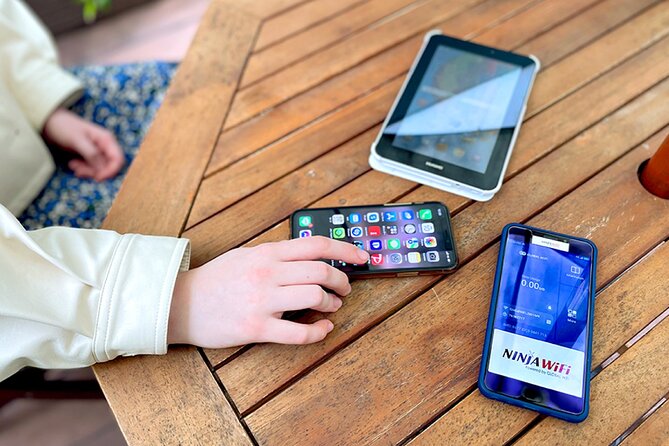
The basic plan is straightforward. After you land at Narita, you go to the designated pickup counter at Terminal 1 or Terminal 2, collect the prepared equipment, and turn on the router before heading toward Tokyo or another part of Japan.
That timing matters. Narita is well connected by public transportation, but your first train ride may be the moment you most need directions. With the router working, you can check Google Maps, look up station information, contact your accommodation, or use translation tools without hunting for airport WiFi.
The counters are outside airport security. You therefore need to collect the device before passing through any restricted area, and you should allow enough time to find the counter after baggage claim. The mobile ticket makes the booking information easy to carry on your phone, but keep your confirmation accessible before your battery gets low.
A useful practical detail is that the equipment may be packed and ready when you arrive. The setup has been described as easy, which is what you want after a long flight. Still, check that the router, cable, adapter, and power bank are all present before leaving the counter. A quick check at the airport is simpler than discovering a missing item later.
More arrival practicalities:
- Japan: eSIM with Unlimited Local 4G/5G Data
★ 4.5 · 163 reviews - Unlimited WiFi Router – Haneda Airport (Tokyo) Pickup
★ 3.5 · 23 reviews - Tokyo: Pre Japan Planning Kit: Itineraries, Food & Survival
★ 4.9 · 18 reviews
What comes in the rental package
You receive more than a small WiFi box. The package includes:
- A 4G LTE WiFi router
- A USB cable
- An adapter
- A power bank
The power bank is the item I value most. A phone used for navigation, translation, train schedules, camera work, and messaging can lose power quickly. You can use the power bank to keep your phone going while the router provides the connection, though you should still return all equipment as instructed.
The adapter and USB cable also reduce the need to pack a separate charging solution. The supplied items make this a practical airport pickup rather than simply a handoff of a router that you must prepare yourself.
The device is designed for portable use, so you can carry it during city walks, train rides, and day trips. The important benefit is not speed for its own sake. It is having one dependable connection for several travel tasks instead of repeatedly searching for public WiFi.
Using 4G LTE around Japan
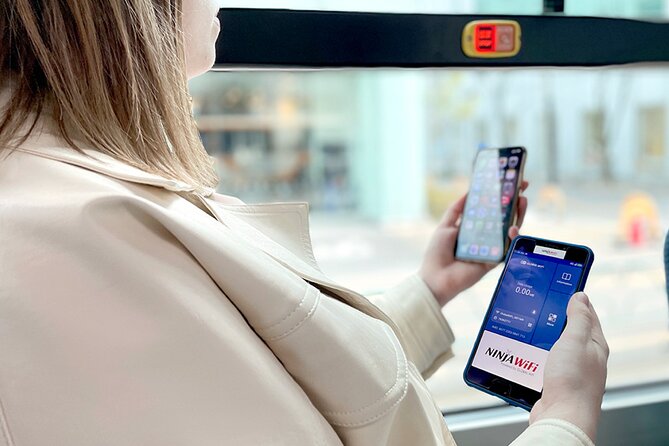
The router provides 4G LTE access in Japan. That gives you the connection needed for common travel jobs: opening maps, checking social media, sending messages, watching YouTube, and looking up information while you are out.
For most visitors, the greatest value comes from navigation. Japanese stations can be large, and street addresses are not always intuitive to visitors. A live map can help you confirm your route before you leave a station or locate a restaurant, hotel, or meeting point.
Translation is another practical use. You can use online translation tools when reading signs, menus, or short messages. The connection can also help you contact accommodation staff if your arrival time changes.
The daily limit deserves close attention. High-speed data is limited to 3GB per day. That is a useful allowance for maps, messages, searches, and moderate social media use, but constant video streaming or heavy file transfers could consume it more quickly.
If you plan to watch a lot of YouTube, download large files, or connect a laptop for demanding work, you should monitor your usage. The router is best viewed as a travel connection for everyday needs, not a promise of unlimited high-speed streaming with no restrictions.
How many devices can connect?
The information provided gives two different figures. One section says the router can connect up to 10 devices, while the operating details say up to 5 devices at once.
That conflict is worth treating seriously. If you are traveling alone or as a couple, it should not cause trouble. You might connect two phones, a tablet, and perhaps another device. For a larger group, I would assume a five-device limit until you confirm otherwise at pickup.
A portable router can be handy for families or friends because one rental can serve several people. You do not need to arrange a separate SIM or data plan for every phone. But more connected devices also mean more battery use and faster data consumption, especially if everyone is streaming or using social media.
For a group of up to five people using maps and messages, the arrangement could be convenient. For ten active devices, it may be too ambitious. The safest approach is to connect only the devices you need and keep video use modest.
A few more Narita bookings worth comparing
- Narita Airport (NRT) Private Transfer to Central Tokyo
★ 4.5 · 300 reviews - Private arrival Transfer from Narita Airport(NRT) to central Tokyo city
★ 4.5 · 128 reviews - Narita Airport(NRT): Private Transfer to Tokyo/Yokohama 1-9pax
★ 5.0 · 47 reviews - From Narita Airport: Private Layover or Transit Guided Tour
★ 4.8 · 29 reviews
Rental periods from 3 to 30 days

The rental period is one of the stronger features. You can choose a short three-day period for a quick Tokyo visit, or keep the router for up to 30 days during a longer Japan trip.
That range suits several kinds of plans:
- A short stop in Tokyo before continuing elsewhere
- A weeklong visit with several cities
- A two-week holiday using trains and local transport
- A monthlong stay that needs regular mobile access
The rental duration should cover the days you need the device, from arrival through departure. Since the pickup point is at Narita, this option is most useful if your Japan trip begins there. If you arrive at a different airport or need the device before reaching Narita, this particular arrangement may not fit your route.
At $15.85 per person, the value depends on how many days you use it and how many devices share the connection. For one person on a very short visit, a phone plan or free WiFi might cost less. For a couple or small group sharing several devices, the price can make more sense because one rental supports multiple users and includes the charging equipment.
I would also compare the total rental price with the number of days, not just the advertised starting figure. The final cost can vary with the chosen rental period. A three-day booking and a 30-day booking are not the same purchase.
Returning the router without a last-minute problem

Pickup and return counters are located outside airport security. This is easy enough if you plan for it, but it affects your departure routine.
Do not wait until you are about to board. Return the equipment before passing through security, allowing time to find the counter and deal with the router, cable, adapter, and power bank. If you are departing from a different terminal than the one you used on arrival, confirm the correct return location as part of your airport plan.
The most important rule is simple: collect the router. No refund is provided if you fail to pick it up. If your flight changes or you decide not to use the service, the cancellation terms allow a full refund when you cancel at least 24 hours before the experience start time. Cancellations made later than that are not refunded, and changes within 24 hours are not accepted.
That policy makes early planning worthwhile. Your confirmation arrives at booking, so check the pickup terminal, rental dates, and airport plans while you still have time to make changes.
The main strengths for a Japan trip

I see three clear benefits here.
First, the connection starts at the airport. You do not need to wait until you reach Tokyo, find a shop, or arrange a local connection after a long flight. You can use the internet during the first part of your trip, when help with trains and directions is most valuable.
Second, the package is ready for practical use. A router alone is less helpful if your phone battery dies. Including a power bank makes the setup more useful for a full day away from your hotel.
Third, the rental period is broad. Many airport services force you into a narrow schedule, but 3 to 30 days covers most ordinary visits. You can select a period that matches your itinerary instead of paying for a much longer rental than needed.
The service also suits people who want one shared connection. A couple can use it for both phones, and a small family can connect several devices without arranging separate mobile service for each person.
The limitations you should weigh

The 3GB daily high-speed cap is the biggest technical limitation. For navigation, translation, messaging, browsing, and moderate social media, it may be enough. Heavy video use could change the calculation.
The device capacity is also unclear. The advertised range includes both five and ten devices. That is not a detail I would ignore if you are booking for a large group. Use five as your working limit, and ask at the counter if the exact capacity matters to your plans.
Airport pickup is convenient only if your route uses Narita. Narita is in Chiba Prefecture, outside central Tokyo, and some people arrive at Haneda or go directly elsewhere. This service does not solve the connection problem for an arrival at another airport.
Finally, collection is not optional. If you do not pick up the router, you do not receive a refund. Keep that in mind if your flight plans are uncertain or if you are considering a last-minute change.
Who will get the most value from it?

I would consider this rental for a couple, family, or small group that wants a shared connection from the moment it reaches Narita. It is also a good fit for anyone who relies heavily on Google Maps, translation, and online transport information.
It makes particular sense if you are visiting Japan for at least several days and moving between cities. A portable connection can help while you are away from hotel WiFi, especially during long train journeys or day trips.
Solo visitors should compare the price with other mobile options before booking. The included power bank and airport convenience still have value, but a single phone user may not need a shared router.
People who expect to stream large amounts of video or connect many devices should also compare alternatives. The 3GB daily high-speed limit and five-device planning figure may not match heavy use.
The experience is listed for a maximum of 10 participants, though the practical connection capacity is a separate issue. Most people can participate, and the pickup point is near public transportation, which helps make the first airport transfer easier.
Should you book the Narita WiFi rental?
Book it if you want simple airport pickup, a shared connection, and backup power for a trip lasting 3 to 30 days. The ready-to-collect package removes several small tasks from your arrival day, and the router can help you navigate Japan from the airport onward.
Think twice if your trip begins somewhere other than Narita, if you need more than 3GB of high-speed data each day, or if ten devices must connect at once. For normal use by one person, a couple, or a small group, the service offers practical value, but you should plan around five connected devices and treat the daily data cap as real.
FAQ
Where do I pick up the WiFi router?
You can pick it up at Narita International Airport at either Terminal 1 or Terminal 2.
Are the pickup counters inside airport security?
No. The pickup and return counters are outside airport security.
How long can I rent the router?
The available rental period ranges from 3 to 30 days.
What type of connection does the router provide?
The router provides a 4G LTE WiFi connection in Japan.
How many devices can connect to the router?
The provided information gives two different limits, up to 10 devices in one section and up to 5 devices in another. If the exact number matters, plan conservatively for five devices and confirm at pickup.
What equipment is included?
The rental includes the WiFi router, USB cable, adapter, and power bank.
Is high-speed data unlimited?
No. High-speed data is limited to 3GB per day.
What happens if I do not pick up the router?
A refund will not be provided if you fail to collect the WiFi router.
Can I cancel for a full refund?
Yes. You can cancel for a full refund if you cancel at least 24 hours before the experience start time. Cancellations and changes made less than 24 hours before the start time are not accepted or refunded.
New on our Narita list
- 9-Day Japan and South Korea Highlight Tour★ 4.5 · 3 reviews
- Tokyo Layover Tour with Licensed Guide:Narita Airport Dep★ 4.5 · 4 reviews
- Private Arrival Transfer : Narita International Airport to Tokyo Disney★ 5.0 · 4 reviews
- Tokyo Narita Airport (NRT) Transfer Private Transfer(Single way)★ 5.0 · 5 reviews
- Narita-san Private Layover Tour from Narita International Airport★ 5.0 · 5 reviews
- Private Chauffeur from Narita Airport to Tokyo★ 5.0 · 5 reviews
- Private Arrival Transfer : Narita International Airport to Yokohama City★ 5.0 · 6 reviews
- Narita Layover tour with National Licensed guide★ 5.0 · 7 reviews