
Reviewed · TOKYO TRAVEL ESSENTIALS
Japan: eSIM with Unlimited Local 4G/5G Data
Japan’s train maps, translation tools, restaurant searches, and ticket apps all work better when your phone connects quickly. This KDDI eSIM gives you local 4G/5G data without visiting a shop or swapping a tiny plastic card. You choose the Ultra or Lite plan, scan a QR code, and activate it after arriving in Japan.
I like the simple QR setup and the option of unthrottled data on Ultra. I also like that the connection can be shared by hotspot, though the sharing limits matter. The main catch is timing: the eSIM QR code arrives separately by email one day before your activity date, and service begins only once you connect to KDDI in Japan.
In This Review
- Key Points
- Why Mobile Data Matters in Japan
- Picking Between Ultra and Lite
- Installing the QR Code Before You Fly
- Activating After Arrival in Japan
- What to Do If the QR Code Seems Invalid
- Using Data on Trains and in Cities
- Hotspot Sharing and the Real Limits
- Price and Value at $10
- Who Should Choose This eSIM
- A Few Smart Setup Tips
- Should You Book It?
- FAQ
- Is the eSIM QR code on the booking voucher?
- Does my phone support eSIM?
- When does the eSIM start counting days?
- Are voice calls and SMS included?
- What is the difference between Ultra and Lite?
- Can I use the eSIM as a hotspot?
Key Points
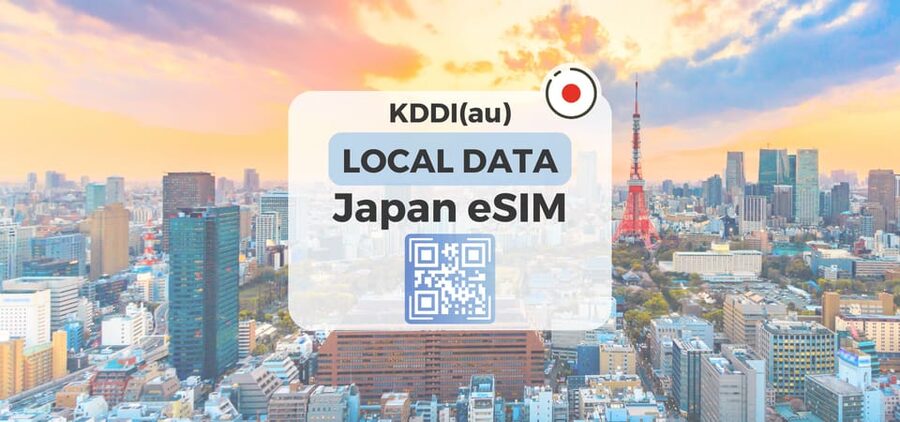
- Two KDDI plans: Choose Ultra for unthrottled 4G/5G data or Lite for speeds up to 10Mbps.
- No physical SIM card: Install the plan by scanning a QR code sent by email.
- Japan-wide coverage: The eSIM is intended for use across Japan, including Honshu.
- Calendar-day billing: A late-night activation can count as a full day by midnight.
- Hotspot with limits: Tethering is supported, but the allowed amount depends on your plan.
- Data only: Voice calls and SMS messaging are not included.
Why Mobile Data Matters in Japan
Japan is easy to explore, but it rewards a working phone. Train stations can have several exits, names may appear in Japanese script, and even a short trip can involve more than one railway company. A data connection lets you check routes, translate signs, look up opening hours, and contact your accommodation when plans shift.
You also avoid the small but repeated costs and delays of relying only on public Wi-Fi. A café connection may help for a few minutes, but it is not much use when you are standing outside a station, looking for the correct entrance, or trying to confirm a train platform.
This plan is data only. You will not receive a Japanese telephone number, voice calling, or SMS. For most visitors, that is fine because messaging apps, internet calls, and hotel communication can work through data. You should keep your regular number active if you need to receive banking codes or other text messages, but check your home carrier’s roaming settings before departure.
More arrival practicalities:
- Unlimited WiFi Router – Haneda Airport (Tokyo) Pickup
★ 3.5 · 23 reviews - Tokyo: Pre Japan Planning Kit: Itineraries, Food & Survival
★ 4.9 · 18 reviews - Japan Unlimited WiFi Router – Narita Airport Pickup
★ 3.5 · 15 reviews
Picking Between Ultra and Lite
The two plans are aimed at different kinds of phone use. Ultra provides unlimited local 5G/4G data with no throttling. That is the better fit if you want the fastest available connection, plan to stream often, upload photos, use cloud services, or connect several devices.
Ultra does not include voice or SMS, just like Lite. Its available duration ranges from 3 to 30 days, giving you more flexibility for a longer Japan trip.
Lite also provides unlimited local 5G/4G data, but the maximum speed is 10Mbps. That is usually enough for maps, translation, email, social media, online tickets, and ordinary browsing. Video calls and streaming can still work, but the lower speed gives you less room for heavy use.
Lite is available for 3 to 10 days. It can be a sensible choice for a short visit when the main job of your phone is navigation and communication through apps. You save money only if the selected Lite option is priced lower at booking, so check the current price for your dates and plan.
The word unlimited needs a little care here. On the phone itself, both plans provide unlimited local data within their stated terms. Hotspot use is restricted, especially on Lite. The supplied allowances are 3GB for a 3-day plan, 4GB for 5 days, 5GB for 6 days, 6GB for 7 days, 7GB for 8 days, 8GB for 9 days, and 9GB for 10 days. Longer listed periods include 15GB for 15 days, 19GB for 20 days, and 30GB for 30 days.
Installing the QR Code Before You Fly
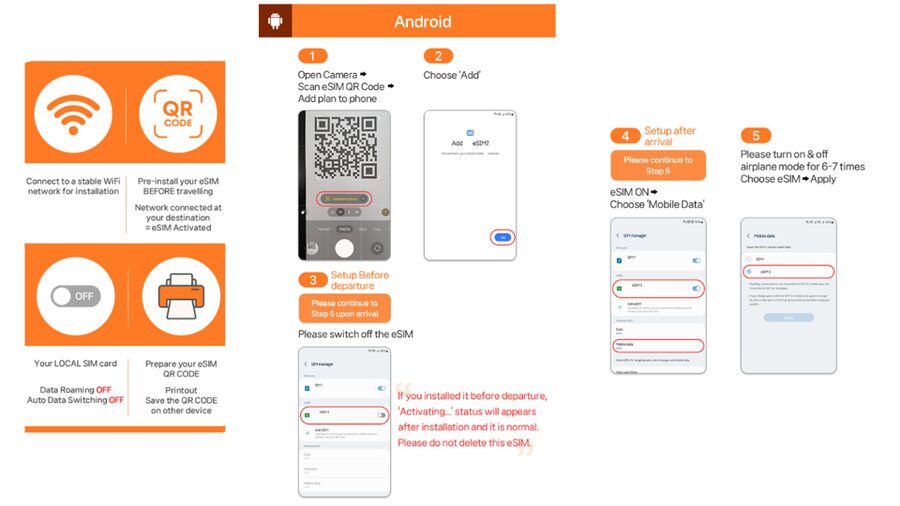
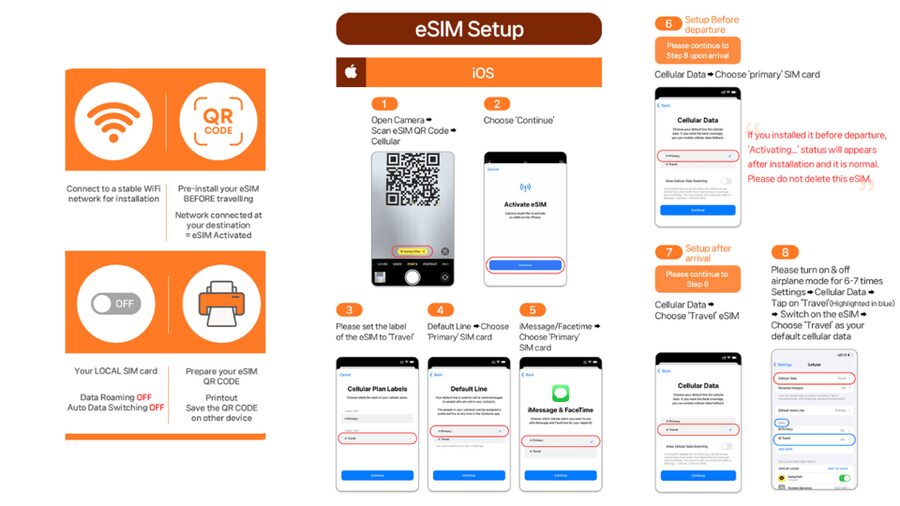
The most important practical detail is that the QR code on your booking voucher is not the eSIM installation code. LINK KOREA sends the actual eSIM QR code separately by email, one day before the activity date.
Save that email before leaving home. It is wise to keep the QR code available on another device or in a printed form, since you may need to scan it with the phone receiving the eSIM. Do not delete the message after installation, since it also contains the setup guide and frequently asked questions.
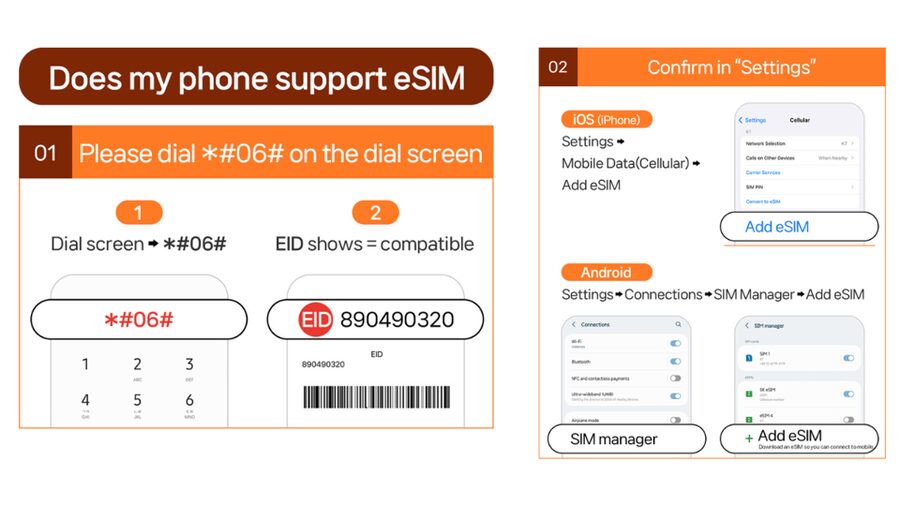
Your phone must support eSIM and be unlocked for a foreign SIM or eSIM. A quick check is available on many phones: open the dial screen, enter #06#, and look for an EID number. If no EID appears, the phone is not compatible with eSIM according to the supplied instructions.
Compatibility can vary by model, purchase region, and carrier status. Check your exact phone before paying. This matters because refunds are not accepted once the eSIM QR code has been sent.
Install the eSIM before your flight if your phone allows it, but do not expect Japanese service at home. The plan connects to the local KDDI network only after you arrive in Japan. Keep your normal SIM available until you are sure the new line is installed.
Activating After Arrival in Japan
The eSIM begins its usage period when it first connects to the KDDI network in Japan. That sounds straightforward, but the calendar-day rule deserves attention.
The plan counts calendar days from the first connection. If you activate at 10 p.m. in Japan, that day counts as one full day, and midnight begins another calendar day. For a short plan, avoid switching on the Japanese line hours before you need it.
You can install the eSIM before departure and wait to activate mobile data after landing. Airport Wi-Fi may help with the first setup, but the supplied instructions clearly state that the local connection begins after arrival in Japan.
The service uses KDDI, also known as au. Coverage is listed for Japan. Actual 5G access depends on your location, so the phone may switch to 4G indoors, underground, or in crowded areas. That is normal and does not necessarily mean the eSIM has failed.
A few more Tokyo bookings worth comparing
- Mt Fuji and Hakone 1-Day Bus Tour Return by Bullet Train
★ 5.0 · 26,383 reviews - 1-Day Tokyo Bus Tour
★ 5.0 · 14,250 reviews - Tokyo: TOKYO SKYTREE® Admission ticket
★ 4.5 · 11,192 reviews - Tokyo: teamLab Planets TOKYO Digital Art Museum Entry Ticket
★ 4.6 · 9,779 reviews
What to Do If the QR Code Seems Invalid
A common setup problem is a message such as QR code is invalid. Do not immediately assume the purchase is unusable. The instructions advise checking your phone’s cellular or SIM settings to see if a new eSIM has already appeared.
On an iPhone, go to Settings, then Cellular. On an Android phone, go to Settings, Connections, and SIM Manager. Look for a newly added eSIM profile.
If it appears, follow the phone’s prompts and select the eSIM for mobile data after you reach Japan. If you still have trouble, contact the supplier by email or WhatsApp. Have your phone model and booking information ready, and allow time for assistance before your plan period begins.
This is one reason I would not wait until you are rushing through an airport to install the service. Set it up calmly at home, then use the arrival day only for selecting the correct data line and checking the connection.
Using Data on Trains and in Cities
A good mobile plan earns its keep in transit. Japan’s rail system is precise but can be demanding when you are changing lines, comparing routes, or choosing between a local and an express train. A working connection lets you check schedules and station information as you move.
One user specifically found the signal available even on the subway. That is useful, but you should still expect some interruptions underground, particularly when a train enters a tunnel or a station is crowded. The plan’s 4G/5G service is not a promise of constant 5G everywhere.
In cities, you can use maps to find smaller restaurants, check business hours, and translate menus or notices. Outside major centers, speeds and coverage can vary with location. The advertised coverage area is Japan, but no mobile service can guarantee the same signal inside every building or remote spot.
The unlimited phone data also helps if you are taking many photos and need to back them up. Ultra is the stronger option for large uploads and steady streaming. Lite is more suited to practical trip tasks, where 10Mbps is generally adequate.
Hotspot Sharing and the Real Limits
Hotspot sharing is included, but it is not unlimited in the same way as on-phone data. The allowance depends on the selected duration, with specific limits from 3GB on the 3-day option to 30GB on the 30-day option.
This can work well for occasional laptop use, a second phone, or sharing a connection during a short wait. It is not designed as a full replacement for hotel internet if you plan to work online every day or stream large amounts of video to several devices.
If you are traveling with family or friends, decide who truly needs tethering. One person can use the eSIM for maps and translation while another connects briefly to check email. Keep an eye on shared data, since the allowance is much smaller than the unlimited data available directly on the eSIM phone.
Ultra may be worth considering if you need better speed on your own phone, but hotspot restrictions still apply. The stated terms say hotspot support has limitations depending on the selected plan, so do not buy this specifically as a home internet substitute.
Price and Value at $10
At $10 per person, this is a low-cost way to handle the basic communication needs of a Japan trip. The value is strongest if you want immediate access to maps, translation, train information, and messaging without buying a physical SIM after landing.
The price becomes especially attractive for a short trip, provided your phone is compatible and unlocked. You are paying for convenience as much as data. There is no shop visit, no physical card to lose, and no need to find a Japanese provider at the airport.
The trade-off is that the price alone does not tell you which plan or duration you are getting. Compare the Ultra and Lite choices carefully. A 10Mbps Lite plan may be plenty for a practical sightseeing trip, while someone working remotely or moving large files should look closely at Ultra.
Also factor in the no-refund rule after the QR code has been sent. Confirm your phone compatibility first, and make sure your travel date is correct before the email delivery point. Cancellation up to 24 hours in advance is available for a full refund, but that protection ends once the eSIM code has been issued.
Who Should Choose This eSIM
I would recommend this option to you if you want a quick, data-only connection and prefer to arrange it before flying. It suits solo visitors who rely on navigation, couples who can use one phone as a hotspot now and then, and short-term visitors who do not need a Japanese telephone number.
It is also useful for anyone who dislikes handling SIM cards. You keep your physical SIM in place and add the Japanese eSIM digitally. That can make it easier to retain your regular number, though you remain responsible for managing roaming charges on your home line.
Choose Ultra if you want unthrottled speed or expect heavy data use. Choose Lite if your needs are mostly maps, translation, messaging, and light browsing. For longer trips, Ultra has the wider duration range, from 3 through 30 days.
I would be more cautious if you need voice calls, SMS, or a large, unrestricted hotspot allowance. This is a local data connection, not a complete mobile phone replacement. It also requires you to be comfortable checking settings and handling a QR installation.
A Few Smart Setup Tips
Before purchase, confirm three things: your phone has an EID, your device is unlocked, and your intended travel dates match the eSIM delivery and activation rules.
After receiving the code, install the eSIM while you have a stable connection. Label the new line Japan or KDDI so you do not confuse it with your home SIM. After landing, select the eSIM for mobile data and wait for it to connect to KDDI.
Turn off data roaming on your home line if you do not want accidental charges. Keep the home line available for calls or text messages only if your carrier’s terms make that worthwhile.
If your phone shows 4G instead of 5G, do not panic. Indoor locations, underground stations, and crowded areas can cause the service to switch networks. The connection can still be perfectly usable for ordinary travel tasks.
Should You Book It?
Book this eSIM if your priority is easy local data at a modest price. The strongest points are the QR installation, Japan-wide KDDI coverage, and the choice between faster Ultra service and more limited Lite service. The positive experience of easy installation, broad signal access, and phone sharing fits the needs of many short visits.
Take a moment before buying if your phone compatibility is uncertain, you need SMS or voice service, or you plan to use your laptop heavily through hotspot. For most visitors who want maps, translation, messaging, and train information without a physical SIM, this is a practical choice. Just install it early, activate it after arrival, and watch the calendar when starting a short plan.
FAQ
Is the eSIM QR code on the booking voucher?
No. The QR code on the voucher is not the eSIM installation code. The actual eSIM QR code is sent separately by email one day before the activity date.
Does my phone support eSIM?
Your phone must support eSIM and be unlocked for a foreign SIM or eSIM. Enter #06# on the dial screen and check for an EID. If no EID appears, the phone is not compatible with eSIM according to the supplied instructions.
When does the eSIM start counting days?
The plan starts counting when it first connects to the KDDI network in Japan. Usage is based on calendar days, so an activation at 10 p.m. counts as a full day by midnight.
Are voice calls and SMS included?
No. The eSIM provides local data only. Voice calls and SMS messaging are not included.
What is the difference between Ultra and Lite?
Ultra provides unlimited local 5G/4G data with no throttling and is available for 3 to 30 days. Lite provides unlimited local 5G/4G data at speeds up to 10Mbps and is available for 3 to 10 days.
Can I use the eSIM as a hotspot?
Yes, hotspot sharing is supported with limitations. The allowed hotspot amount depends on the plan duration, ranging from 3GB for the 3-day option to 30GB for the 30-day option.
New on our Tokyo list
- Sumi-e Experience in a relaxing green tea shop in Tokyo★ 5.0 · 3 reviews
- Tokyo : Kamikaze Street Drift Ride★ 5.0 · 3 reviews
- Private Zen Meditation in English in Shinjuku, Tokyo★ 5.0 · 3 reviews
- Onsen Spa in Tokyo and Asakusa Bar Hopping with Local Guide★ 5.0 · 3 reviews
- Easy for everyone! Now you can play handmade mini shamisen and show off to everyone! Musical instruments, sweets and live music★ 5.0 · 3 reviews
- Tokyo: Private Tsukiji Street Food & Sake with Local Guide★ 5.0 · 3 reviews
- Mt Fuji Exploration Tour with Free Japanese Kusa Mochi from Tokyo★ 4.5 · 3 reviews
- Tokyo Tsukiji Fish Market Walking and Exploring Hidden Gems Tour★ 5.0 · 3 reviews