
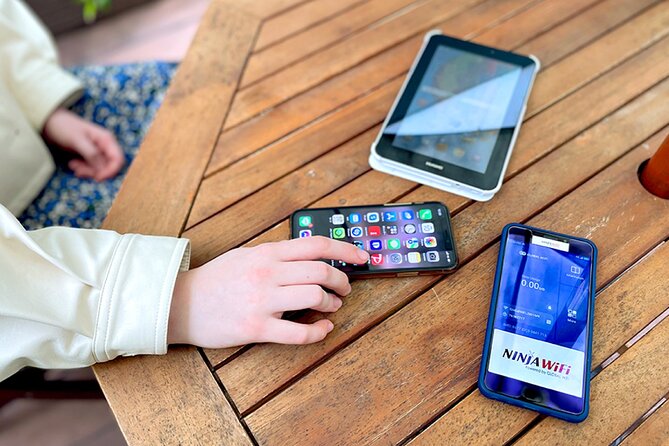
Reviewed · TOKYO TRAVEL ESSENTIALS
Unlimited WiFi Router – Haneda Airport (Tokyo) Pickup
Landing at Haneda with working internet is a small luxury that quickly becomes a practical necessity. This NINJA WiFi router gives you maps, messages, translations, and transport information as soon as you leave the arrival hall, without hunting for a SIM card or relying on spotty public WiFi. I especially like the included power bank and the simple airport pickup.
I also like the reliable 4G connection, which has worked well for maps, social media, and visits to Tokyo Disney parks. The main catch is the 3GB daily high-speed limit, plus some confusion over the exact pickup hours, return point, and the advertised device capacity.
In This Review
- Key Points to Know Before You Book
- What You Actually Pick Up at Haneda
- Finding the Counter in Terminal 3
- Terminal 2 Pickup and Return Details
- How the 4G Connection Performs in Daily Use
- The 3GB Limit and the Meaning of Unlimited
- Is $14.48 a Good Value?
- What Can Go Wrong at Pickup
- Returning the Router Without a Last-Minute Scramble
- Who Will Like This Rental Most
- Booking, Cancellation, and Basic Practical Advice
- Should You Book the Haneda NINJA WiFi Router?
- FAQ
- Where do I pick up the router at Haneda Airport?
- What are the pickup hours?
- What do I need to collect the WiFi router?
- How many devices can connect to the router?
- Is the data really unlimited?
- What equipment is included?
- Where do I return the router?
- Can I cancel for a refund?
Key Points to Know Before You Book

- Pickup at Haneda: Collect the router outside airport security at Terminal 2 or Terminal 3.
- Useful arrival hours: Terminal 3 service is listed from 6:30am to 11:45pm, while Terminal 2 service runs from 6:00am to 11:00pm.
- 3GB of high-speed data daily: After that limit, speeds may be reduced, so heavy video use needs care.
- Power bank included: The kit contains a router, USB cable, adapter, pouch, and portable battery.
- Device capacity needs checking: The main details say up to 10 devices, while another section says up to 5 at once.
- Return before leaving: Return arrangements differ by terminal, and the counters are outside security.
What You Actually Pick Up at Haneda
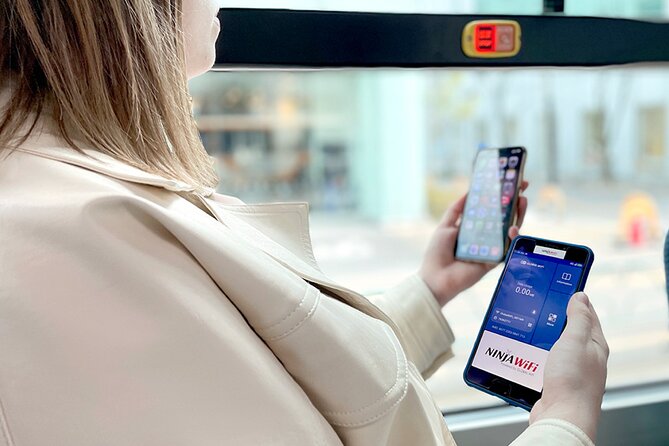
This is not a guided tour or a sightseeing activity. It is a short airport service that gets you connected for the rest of your time in Japan. You reserve the rental, show your confirmation and passport, collect the equipment, and switch it on.
The package includes the 4G LTE router, USB cable, wall adapter, WiFi pouch, and a power bank. That last item matters. A pocket router can run through its battery during a long day of train rides, sightseeing, and map use, so having a spare battery removes one common nuisance.
You can use the connection for Google Maps, Facebook, Instagram, YouTube, messages, and other online services. The connection is intended for use throughout Japan, not just in Tokyo, so it can help on a wider itinerary as well.
The package is advertised as connecting up to 10 devices. Elsewhere, the operating details say up to 5 devices at once. Since those numbers do not match, I would plan around five connected devices unless the counter confirms otherwise. For one person, a couple, or a small family, that is usually enough for phones and perhaps a tablet or laptop.
More arrival practicalities:
- Japan: eSIM with Unlimited Local 4G/5G Data
★ 4.5 · 163 reviews - Tokyo: Pre Japan Planning Kit: Itineraries, Food & Survival
★ 4.9 · 18 reviews - Japan Unlimited WiFi Router – Narita Airport Pickup
★ 3.5 · 15 reviews
Finding the Counter in Terminal 3
Terminal 3 is the most clearly described pickup point. After collecting your luggage, go to the 2F Arrivals Lobby and look for the Global WiFi x NINJA WiFi counter.
The counter is outside the secure area. You do not need to pass through airport security to collect or return the router. The listed Terminal 3 counter hours are 6:30am to 11:45pm, though the main booking details give a slightly different start time of 6:45am. If your flight arrives very early, do not assume the counter will be open. The safest approach is to check the terminal-specific hours attached to your booking.
The service is designed to be quick. You show your reservation form and passport, and the staff provide the device and instructions. In one smooth handoff, you can be online before taking the train into central Tokyo.
Still, allow a little time. The counter sign may not be easy to spot from the arrival area, and one customer had trouble locating the business sign. Another had to wait more than 15 minutes while staff searched for the reservation, even with a printed email. Keep your confirmation easy to open, and carry a printed copy if your phone is not yet connected.
Terminal 2 Pickup and Return Details

If you arrive at Terminal 2, go to the 2F J WiFi & Mobile x Global WiFi counter. The listed hours are 6:00am to 11:00pm.
Terminal 2 has a pickup, return, and return-box arrangement at this counter. That is simpler than the late-night setup at Terminal 3, but you still need to confirm which terminal you are using. Haneda’s terminals are not interchangeable in the practical sense, especially when you have luggage and a departing flight to catch.
The counters sit outside security, which is convenient on arrival. It also means you must return the equipment before entering the secure departure area. Do not pack the router in checked luggage or leave the return task until the last minute.
For Terminal 3, the regular pickup and return counter is listed at the same 2F Arrivals Lobby location from 6:30am to 11:45pm. A return box at the JAL ABC counter is listed for 11:45pm to 6:30am. One important point is that the map information can be misleading. The return location may be the same place where you picked up the device, rather than the separate point shown on a map.
How the 4G Connection Performs in Daily Use

The strongest part of this rental is its basic job: getting you online without much fuss. The router has provided reliable service for maps, messages, social media, and general browsing. It has also worked well in a Tokyo Disney visit, where having directions and communication available can make a long day easier.
The connection is described as 4G LTE. That is enough for ordinary sightseeing needs. You can look up a restaurant, check a train route, translate a sign, message home, or pull up a reservation while moving around Japan.
The plan is not truly unlimited at full speed. High-speed data is limited to 3GB per day. That is a generous allowance for maps, web browsing, email, and messages. It can become restrictive if you stream a lot of video, upload large files, use several devices heavily, or treat the router as your full-time home internet connection.
YouTube is specifically listed as a possible use, but frequent video streaming is exactly where the daily limit can disappear quickly. If you want to preserve speed, download entertainment before leaving your hotel and use the router mainly for navigation and communication.
The router can last through much of a day on its own battery. One user found there was enough power for a full day without charging. Results will depend on how many devices are connected and how heavily you use the network, but the included power bank gives you a useful backup.
A few more Tokyo bookings worth comparing
- Mt Fuji and Hakone 1-Day Bus Tour Return by Bullet Train
★ 5.0 · 26,383 reviews - 1-Day Tokyo Bus Tour
★ 5.0 · 14,250 reviews - Tokyo: TOKYO SKYTREE® Admission ticket
★ 4.5 · 11,192 reviews - Tokyo: teamLab Planets TOKYO Digital Art Museum Entry Ticket
★ 4.6 · 9,779 reviews
The 3GB Limit and the Meaning of Unlimited

The word unlimited needs a careful reading here. The rental allows ongoing data use for the rental period, but high-speed data is capped at 3GB per day. The supplied information does not state the exact reduced speed after that allowance is used.
For most sightseeing days, 3GB should cover ordinary phone use. Think maps, translation, messaging, browsing, occasional photos, and moderate social media. A group sharing the router among several phones can use data faster, especially if automatic photo backups or video apps are active.
Before you leave the airport, check your phones for background data use. Pause automatic cloud backups, app updates, and high-resolution video settings if you are sharing the router. Those small changes can help keep your connection useful until midnight.
The rental period is described as 3 to 30 days, while the device is also said to be usable for up to 90 days. The practical booking range appears to be 3 to 30 days, and the 90-day statement may refer to the maximum possible service duration. If you need more than 30 days, confirm the exact arrangement before paying.
Is $14.48 a Good Value?

The listed price is $14.48 per person, but the value depends on the rental length and how many people share the device. Since a router can connect several devices, a couple or family may find it cheaper than buying separate mobile data plans.
For a short visit, the convenience has real value. You land, collect one small kit, and use it across Japan. There is no need to compare Japanese SIM formats, check whether your phone is unlocked, or find a shop after a long flight.
The calculation changes if you are traveling alone and already have a strong international phone plan. In that case, the router adds another device to carry and another battery to manage. The rental makes more sense when you need data for several phones or want to keep your main phone plan untouched.
The daily 3GB high-speed ceiling also affects value. If your group uses the connection for normal navigation and messaging, the allowance should be practical. If you plan heavy streaming, tethering, or constant uploads, a different data solution may suit you better.
The price is not a reason by itself to book or reject the service. Compare it with the total cost of individual SIMs or eSIMs, then consider the convenience of one shared connection.
What Can Go Wrong at Pickup

Most of the pickup process should be straightforward, but airport rentals depend on clear instructions and accurate reservation records. Bring your passport and booking confirmation. A printed confirmation is useful if you have not activated mobile service yet.
The staff may give basic instructions, but English ability can vary. One customer found communication difficult and waited while the reservation was located. Another reported an unpleasant experience after a flight delay, including repeated messages about extra charges.
That does not mean every delayed flight creates a problem, but it is a reason to read the late-arrival terms carefully. The counter closes at a stated time, and the information does not promise an automatic hold for a delayed flight. If your arrival time changes, contact the provider as soon as possible.
The service is offered by Vision Inc. The supplied information does not name an individual guide or airport representative, so you should expect a counter transaction rather than personal assistance through the rest of your trip.
Returning the Router Without a Last-Minute Scramble
Returning the device is easy only if you plan for it. Keep the router, cable, adapter, pouch, and power bank together throughout the trip. Place everything in the supplied pouch when you finish using it.
At Terminal 3, the regular counter operates until 11:45pm, with a return box listed at the JAL ABC counter from 11:45pm to 6:30am. At Terminal 2, the listed counter and return box operate until 11:00pm.
The map deserves special attention. The return point shown in directions may be incorrect, and the actual drop-off can be at the same counter used for pickup. Check the terminal signs when you arrive rather than following an old map image blindly.
Because all return locations are outside security, return the router before going through departure screening. If you are running late, the return box may help where available, but do not assume every terminal has identical overnight arrangements.
Failure to collect the router does not qualify for a refund. That makes timing especially important if you arrive after the counter closes or your flight schedule changes.
Who Will Like This Rental Most
I would consider this service for:
- Families sharing several phones and tablets
- Couples who want one connection for maps and messaging
- Visitors making trips beyond Tokyo
- Anyone who wants internet immediately after landing
- People who do not want to change their phone SIM
- Visitors who need a power bank during long sightseeing days
It is less appealing if you already have an inexpensive international data plan, need more than 3GB of high-speed data daily, or dislike carrying a separate device.
The router is also a sensible choice for a group that wants a single setup. One person carries the pouch, and everyone connects. The tradeoff is that the group needs to stay reasonably close to the router. The supplied details do not specify a WiFi range, so I would not treat it as a way to keep a scattered group connected.
Booking, Cancellation, and Basic Practical Advice
You receive confirmation at booking time. Free cancellation is available if you cancel at least 24 hours before the local start time. Cancellations or changes made inside that window are not refunded or accepted.
The experience is listed as suitable for most people and allows a maximum of 10 participants, though the router itself has a separate device-capacity discrepancy. The service is near public transportation, which makes it useful for starting a Tokyo trip immediately after pickup.
My practical checklist is simple:
- Save the confirmation before flying.
- Bring your passport.
- Note your arrival terminal.
- Check the counter hours for that terminal.
- Keep the router and accessories together.
- Turn off automatic backups if several people share the connection.
- Confirm the return point before going through security.
- Do not count on a refund if you miss pickup.
Should You Book the Haneda NINJA WiFi Router?
Book it if you want simple shared internet from the moment you land, especially for a couple or family. The reliable connection, useful power bank, and easy access to maps make it a practical travel tool rather than a luxury extra.
I would hesitate if you already have good international data or expect to stream heavily. The 3GB daily high-speed limit, uneven English support, unclear device-capacity wording, and confusing return map require a little planning.
For most short Japan visits, the rental offers solid convenience at a reasonable price, provided you confirm the terminal details and understand that unlimited does not mean unlimited high-speed data.
FAQ
Where do I pick up the router at Haneda Airport?
At Terminal 3, pickup is at the 2F Arrivals Lobby Global WiFi x NINJA WiFi counter. At Terminal 2, pickup is at the 2F J WiFi & Mobile x Global WiFi counter.
What are the pickup hours?
Terminal 3 pickup is listed from 6:30am to 11:45pm, although the main details also state 6:45am. Terminal 2 pickup is listed from 6:00am to 11:00pm.
What do I need to collect the WiFi router?
You need your reservation confirmation and passport. A printed confirmation can be helpful if you do not yet have mobile internet.
How many devices can connect to the router?
The main information says up to 10 devices, while another section says up to 5 devices at once. Confirm the exact capacity at pickup, and plan around five devices to be safe.
Is the data really unlimited?
The rental includes ongoing data use, but high-speed data is limited to 3GB per day. The reduced speed after that limit is not specified.
What equipment is included?
The package includes the WiFi router, USB cable, adapter, WiFi pouch, and power bank.
Where do I return the router?
At Terminal 2, return it at the listed J WiFi & Mobile x Global WiFi counter or return box. At Terminal 3, return it at the Global WiFi x NINJA WiFi counter during its operating hours, or use the JAL ABC return box during the stated overnight hours.
Can I cancel for a refund?
Yes. You can receive a full refund if you cancel at least 24 hours before the experience start time. Cancellations or changes made less than 24 hours in advance are not refunded.
New on our Tokyo list
- Sumi-e Experience in a relaxing green tea shop in Tokyo★ 5.0 · 3 reviews
- Tokyo : Kamikaze Street Drift Ride★ 5.0 · 3 reviews
- Private Zen Meditation in English in Shinjuku, Tokyo★ 5.0 · 3 reviews
- Onsen Spa in Tokyo and Asakusa Bar Hopping with Local Guide★ 5.0 · 3 reviews
- Easy for everyone! Now you can play handmade mini shamisen and show off to everyone! Musical instruments, sweets and live music★ 5.0 · 3 reviews
- Tokyo: Private Tsukiji Street Food & Sake with Local Guide★ 5.0 · 3 reviews
- Mt Fuji Exploration Tour with Free Japanese Kusa Mochi from Tokyo★ 4.5 · 3 reviews
- Tokyo Tsukiji Fish Market Walking and Exploring Hidden Gems Tour★ 5.0 · 3 reviews